

Announcements & Release notes
Announcements and Release Notes
Version 1.17
Section titled “Version 1.17”Pending release
🎉 What’s New?
Section titled “🎉 What’s New?”ASAP-734 Search Term Generator (STG): Uses an LLM to expand and diversify user input to provide more comprehensive Semantic Search results. See here for more information: https://app.gitbook.com/o/CYeMNNmXVOb9blrLxGnF/s/OTEcnR1SNgzXuSq60JQZ/user-guides/fulfilments#search-term-generator-details
ASAP-735 Validator: Uses an LLM to double-check the completion for validity. See here for more information: https://app.gitbook.com/o/CYeMNNmXVOb9blrLxGnF/s/OTEcnR1SNgzXuSq60JQZ/~/changes/13/user-guides/assistant-settings#validation-methods
🔧 Technical stuff
Section titled “🔧 Technical stuff”Changed behaviour for Assistant Settings -> Validation Method -> KB Confidence Threshold: If selected, all Semantic Search chunks below the selected score will not be sent to the LLM as part of the Prompt Payload. See here for more information: https://app.gitbook.com/o/CYeMNNmXVOb9blrLxGnF/s/OTEcnR1SNgzXuSq60JQZ/~/changes/13/user-guides/assistant-settings#validation-methods
Version 1.16.2
Section titled “Version 1.16.2”Released on 17 November 2023
🔧 Technical stuff
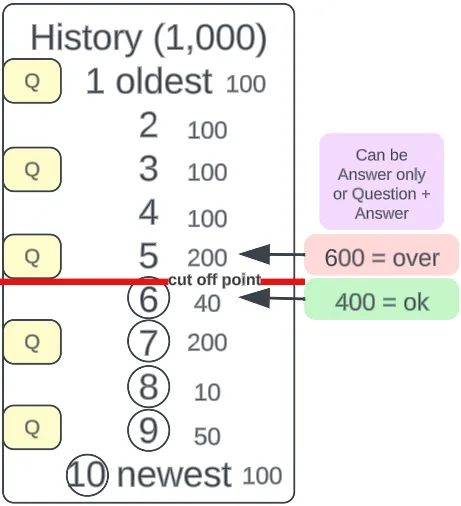
Section titled “🔧 Technical stuff”Message History is now limited to 500 tokens. Any message history that causes the token consumption to exceed 500 tokens will not get sent to the LLM.
Version 1.16
Section titled “Version 1.16”Released on 10 November 2023
🎉 What’s New?
Section titled “🎉 What’s New?”ASAP-661 KB and File Management APIs are now available. For API key management, please contact the ASAP product team. Go here for API specs - https://asap-api-docs.amitysolutions.com/
Version 1.15
Section titled “Version 1.15”Released on 20 October 2023
🎉 What’s New?
Section titled “🎉 What’s New?”ASAP-600 FE: Phase 2 Google Glossary Implementation
ASAP-520 BE: Phase 2 Google Glossary Implementation
There is now a UI for the Glossary. For more information, please refer to the Glossary user guide available on the side bar.
🔧 Technical stuff
Section titled “🔧 Technical stuff”ASAP-564 Documentation for upcoming File and KB management APIs
Documentation can be found here: https://asap-api-docs.amitysolutions.com
Please note this API is not usable on production environments yet as the authentication and actual endpoints are in the process of being set up.
Version 1.14
Section titled “Version 1.14”Released on 4 October 2023
🎉 What’s New?
Section titled “🎉 What’s New?”ASAP-507 As a user, I can view payload information in the Inspect dialogue box.
- Resize the dialogue box to make it more comfortable to read.
- Add a Cognitive Search results button underneath GPT bot responses. This button shows all the cognitive search results.
- The ‘Context’ button has now been changed to ‘Inspect’ and will show all the information ASAP actually sent to the LLM as well as the tokens used for the Prompt, Completion, and in Total.
ASAP-535 Glossary and Document Translation, phase 1
- Initial implementation of Google Glossary to support the translation process.
Teams wishing to use the Glossary must send a CSV to the ASAP product team with 2 columns, en | th, and have 1 entry per language. For example
En Th
Hot Promotion โปรโมชั่นแซ่บ
Wisdom card บัตร Wisdom - When creating a new KB, a max of 2 languages can be selected. En is mandatory and Th is optional. This only applies to KBs created after the launch of version 1.14.
- All documents uploaded to a knowledge base will now go through language detection.
- All files uploaded to a KB marked as “En” will be translated to English. All files uploaded to a KB marked as “En & Th” will be translated to both En and Th languages using Google Glossary (new) to control the translation of specified words.
🔧 Technical stuff
Section titled “🔧 Technical stuff”Please note documents being uploaded now use Google Translate API. This was previously Azure Document Translation.
It will help reduce the cost of translation services because we now translate a document once. Previously, we would translate the fulfilment results every time we sent a payload to OpenAI.
🐛 Bug Fixes
Section titled “🐛 Bug Fixes”There are no additional bug fixes other than the ones addressed in the previous 3 hotfixes.
Hotfix 1.13.3
Section titled “Hotfix 1.13.3”Released on 27 September 2023
🐛 Bug Fixes
Section titled “🐛 Bug Fixes”ASAP-579 API search of Knowledge Base Endpoint returns 500 error.
Hotfix 1.13.2
Section titled “Hotfix 1.13.2”Released on 22 September 2023
🐛 Bug Fixes
Section titled “🐛 Bug Fixes”ASAP-570 Incorrect sorting score order for Thai document search results.
Hotfix 1.13.1
Section titled “Hotfix 1.13.1”Released on 21 September 2023
🎉 What’s New?
Section titled “🎉 What’s New?”ASAP-550 Change the translation setting for the user input.
The following items will no longer be translated automatically:
- User input
- Message history (input + LLM completion)
Instead, those items will be sent to the LLM in the original language, whatever that may be. This is a hotfix to alleviate issues with bad or unexpected translations. Later on, we will enhance this to become an item on the Assistant settings page.
🐛 Bug Fixes
Section titled “🐛 Bug Fixes”ASAP-512 Wrong model selection on calculating token limitation for certain models.
Version 1.13
Section titled “Version 1.13”Released on 16 September 2023
🎉 What’s New?
Section titled “🎉 What’s New?”ASAP-385 As an admin, I can switch between different LLM models so I can control the token limit.
Currently available models are:
- GPT-3.5-4k & GPT-3.5-16k
- GPT-4-8k & GPT-4-32k
ASAP-462 As an admin, I can set the session reset time for each user per assistant.
There are currently 3 ways to reset a session on ASAP.
- Click the new session button in chat on ASAP.
- Change any settings in the Edit Assistant page and click ‘Save’.
- New - Do not message the Assistant for X hours
You will find this new feature on the Assistant Edit page. There are 2 parts to this feature; there is a slider where you can control the timer and a webhook URL where you can choose to send event messages.
When you set the timer, the platform looks at the timestamp to determine if the last message the User sent to the Platform is within the limit set by the admin. If it is, ASAP will include previous messages as part of the context. The maximum number of messages included is 10 (5 from the user & 5 responses from the LLM).
- The slider moves from 0 to 12. If you wish to disable this feature, set the slider to 0.
🔧 Technical stuff
Section titled “🔧 Technical stuff”ASAP-376 Migrate cognitive search stack to new Azure account
ASAP-377 Move OpenAI service to new Azure account
ASAP-378 Move application stack to new Azure account
🐛 Bug Fixes
Section titled “🐛 Bug Fixes”ASAP-489 [Assistant: Edit] Save Changes button is still disabled even after making some changes in Edit page
ASAP-492 [User] Status is observed ‘Null’ for super admin for a newly created account
ASAP-493 [Assistant: Search] Error alert is showing when searching assistant in the Assistant page
ASAP-497 [Account] Token usage line is not showing in the graph
Version 1.12
Section titled “Version 1.12”Released on 31 August 2023
🎉 What’s New?
Section titled “🎉 What’s New?”| Key | Summary |
|---|---|
| ASAP-440 | Implement Azure Form Recogniser |
Azure Form Recogniser will be used in place of the previous Cognitive Search OCR skill. The result is better Thai text extraction and the option to train the Form Recogniser to handle tables (this function is untested).
🔧 Technical stuff
Section titled “🔧 Technical stuff”| Key | Summary |
|---|---|
| ASAP-439 | POC: Google Glossary |
Google Glossary will be implemented in the future to ensure specific words are translated in a controlled manner between different languages e.g. En = Promotion Zaap | Th = โปรโมชั่นแซ่บ. There are some limitations but those will be listed in the release notes when we implement the Glossary.
🐛 Bug Fixes
Section titled “🐛 Bug Fixes”Version 1.11
Section titled “Version 1.11”Released on 18 August 2023
🎉 What’s New?
Section titled “🎉 What’s New?”| Key | Summary |
|---|---|
| ASAP-392 | As an admin, I can choose the cognitive search language (EN & TH) so the results will be more relevant |
🔧Technical stuff
Section titled “🔧Technical stuff”| Key | Summary |
|---|---|
| ASAP-374 | Switch default GPT models to GPT-3.5 Turbo 4k and GPT-4 8k |
🐛 Bug Fixes
Section titled “🐛 Bug Fixes”Was this page helpful?
Thank you for your feedback!