

Assistant API Integration
Get started by integrating our platform with your messaging channel via our API and the provided client secret key.
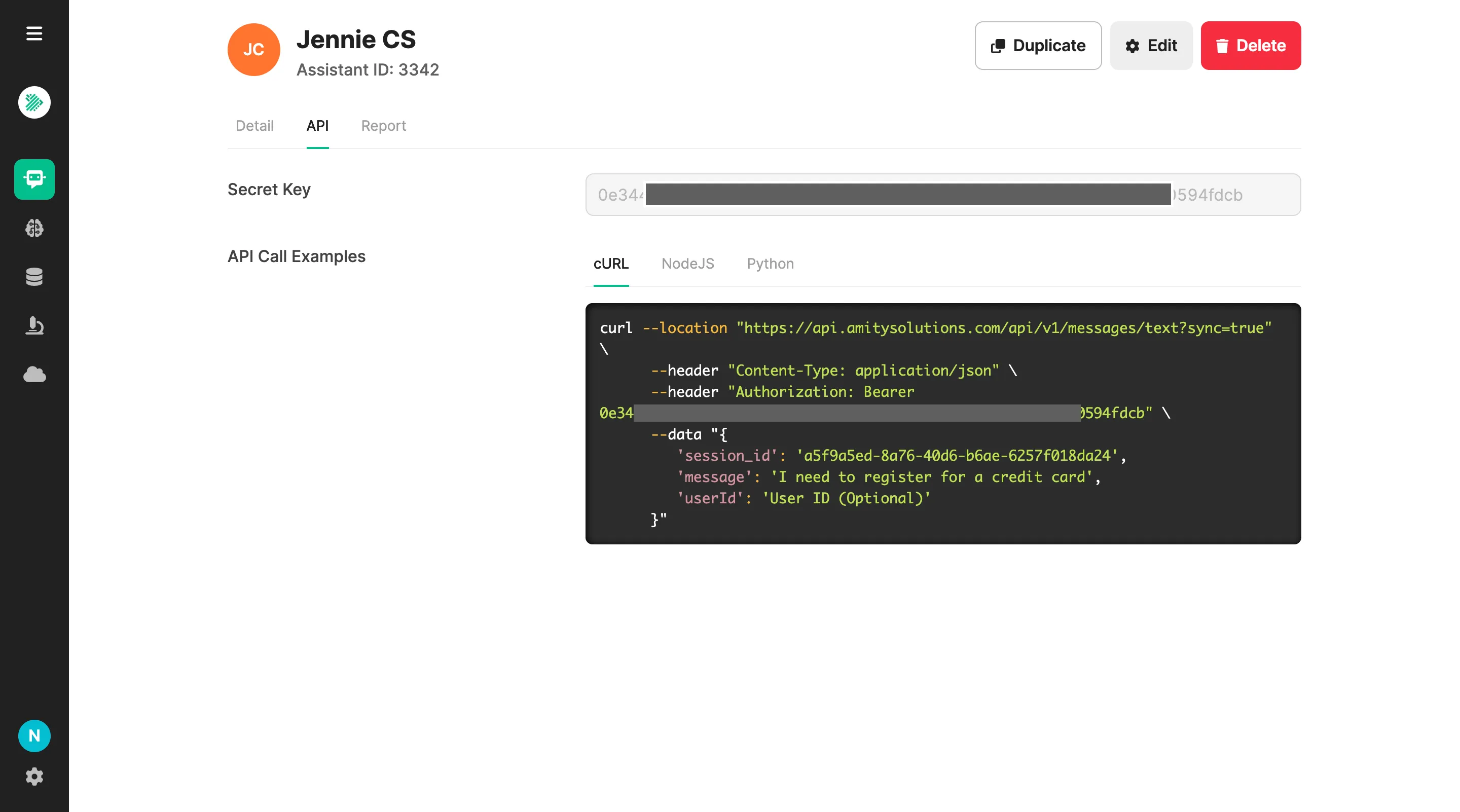
The system will display the Secret Key for the assistant, which you will need for authorization with the BOTs+ Messaging API. You can select your preferred language and add the provided code to your project.
Message Streaming
Section titled “Message Streaming”Enhance the messaging API to support streaming answers. (This feature is currently available only via the API.)
Request Body
Section titled “Request Body”- Add ‘stream’ as a boolean, set TRUE to enable streaming
{ ..., "stream": true}Response Body
Section titled “Response Body”Here’s the example of response body
/// completion in progressdata: {"__status": "active", "content": "Hello"}data: {"__status": "active", "content": "Hello! How may"}
// once processing has finisheddata: {"__status": "finished", "answer": "Hello! How may I help you?" , "inspection": {...}, searchResults: {...}}
// if there are any errorsdata: {"__error", "name": "SampleException", "code": 400000, "status": 400, "message": "error message", "errors": []}
Was this page helpful?
Thank you for your feedback!